~/blog/wazuh-soc-homelab-lxc
Adding Wazuh to a Homelab SOC: Agents, CVEs and the Noise
My log pipeline answers three questions well: what happened (Loki), how much and for how long (Prometheus), and who is attacking (CrowdSec). It answers one badly: what is installed on these machines, and is any of it vulnerable?
That is what Wazuh is for. Every host runs an agent that reports its package inventory, file changes and configuration against a CIS baseline. The server matches the inventory against vulnerability feeds and turns the result into alerts. This post covers putting it in a Proxmox container next to the rest of the SOC, and the first week of findings, most of which were noise.
Sizing: it would not have fitted a month ago
Wazuh’s all-in-one install is three services: an indexer (an OpenSearch fork), the manager that agents talk to, and a dashboard. The indexer is a JVM, and JVMs like memory.
I gave the container 4 vCPUs, 6 GB of RAM and a 40 GB disk. After installation it settled at about 2 GB of RAM and 15 GB of disk. 9.3 GB of that disk is the vulnerability-detection feed in /var/ossec/queue/vd, which is normal for this version and is the number to plan for.
Until the hypervisor’s RAM went from 8 to 16 GB, this did not fit. The lab had already run out of memory once, and an OpenSearch node on top would have made it a weekly event. If your host is tight, the indexer is the component to budget for, not the agents.
Installing
The official assistant does everything, provided you use the right URL:
curl -sO https://packages.wazuh.com/4.14/wazuh-install.sh
bash wazuh-install.sh -a
Use the versioned path. The unversioned …/4.x/wazuh-install.sh that older guides show now returns 403. The assistant also warns that Debian 13 isn’t a recommended system, and then installs fine.
In an LXC container, OpenSearch’s vm.max_map_count requirement is a host kernel setting, because containers share the kernel. Check it on the Proxmox host (sysctl vm.max_map_count); mine was already 1,048,576, so the container needed nothing.
The generated passwords end up in wazuh-install-files.tar next to the script. Move it somewhere only root can read, and don’t print it to your terminal history.
Enrolling the agents
By default anyone who can reach port 1515 can enrol an agent. Turn on the enrollment password first:
<auth>
  <use_password>yes</use_password>
</auth>
with the password in /var/ossec/etc/authd.pass on the manager and the same file on each agent. Then, on every host:
WAZUH_MANAGER=10.99.99.15 WAZUH_AGENT_NAME=web-proxy apt-get install -y wazuh-agent
apt-mark hold wazuh-agent
systemctl enable --now wazuh-agent
Two habits that paid off:
- Name each agent the way the host is labelled everywhere else. My agents carry the same names as the
remote_hostlabel in Loki and thehostlabel in Prometheus, so a Wazuh alert, a log line and a metric for the same machine join on one string. - Hold the agent package. A manager refuses agents newer than itself, so an innocent
apt upgradeon a host can silently disconnect it. Upgrade the manager first, then unhold, upgrade and re-hold the agents. I hold the server packages too (wazuh-indexer,wazuh-manager,wazuh-dashboard,filebeat), because Wazuh upgrades them in a specific order.
Machines outside the LAN (the public server, a laptop) reach the manager over the tailnet, so port 1514 never faces the internet.
One trap during the rollout: I looped ssh over the hosts from a script fed through a heredoc, and only the first host got the agent. Each ssh reads the rest of the script from standard input. Use ssh -n or </dev/null inside such loops.
Retention: delete the history, never the state
Wazuh writes daily indices: alerts, archives, monitoring, statistics. Nothing deletes them by default. An Index State Management policy does:
{
  "policy": {
    "description": "Delete Wazuh event indices after 30 days",
    "default_state": "hot",
    "states": [
      { "name": "hot",
        "actions": [],
        "transitions": [{ "state_name": "delete", "conditions": { "min_index_age": "30d" } }] },
      { "name": "delete", "actions": [{ "delete": {} }], "transitions": [] }
    ],
    "ism_template": [{
      "index_patterns": ["wazuh-alerts-*", "wazuh-archives-*", "wazuh-monitoring-*", "wazuh-statistics-*"]
    }]
  }
}
Leave wazuh-states-* out of it. Those indices are not history: they are the current package inventory and the current vulnerability list. Age them out and Wazuh forgets what is installed.
Creating the policy also created a system index with one replica, which a single-node cluster can never place, and the cluster went yellow. Setting auto_expand_replicas: 0-1 on that index fixed it. Even the admin user gets a 403 on system indices; changing their settings needs the admin certificate (curl --cert admin.pem --key admin-key.pem …).
Push only what is worth waking up for
Wazuh rates every alert from 0 to 15. After a day, my distribution looked like this:
| Level | Count | What it was |
|---|---|---|
| 3 | ~1,500 | routine logins |
| 7 | ~1,800 | rootcheck and CIS findings |
| 10 | 9 | floods of HTTP 400s against the web proxy |
| 12+ | 0 |
So the push threshold is level 12, with 15 marked urgent. Wazuh’s integration daemon runs any script named custom-* in /var/ossec/integrations/, handing it the alert as a JSON file. Mine is a short Python script that POSTs the rule description to an ntfy topic, with a write-only token for that one topic:
<integration>
  <name>custom-ntfy</name>
  <hook_url>https://ntfy.example.org/wazuh</hook_url>
  <level>12</level>
  <alert_format>json</alert_format>
</integration>
Anything below 12 stays on the dashboard. A push channel that fires at level 7 would be muted within a week.
Wazuh in Grafana
The Wazuh dashboard is good, but it is another tab. I wanted the alerts and the CVE list next to the logs and metrics, so Grafana reads the indexer directly with the OpenSearch data source plugin:
- A read-only indexer user for Grafana, whose role can only read the
wazuh-*indices. Writes and the security index return 403. - The indexer’s HTTP API on the LAN address, the transport still on loopback:
http.host: ["127.0.0.1", "10.99.99.15"]. Binding the transport to a LAN address switches OpenSearch into production mode, with bootstrap checks that a container may fail. nftables then drops port 9200 from everything except the monitoring container. - One dashboard, SOC (Wazuh): alerts by level and host, top rules, Critical/High CVEs by host, the packages carrying them, and a feed of level 7+ alerts.
Three plugin quirks cost me time:
- The data source’s health check says “Index not found” with wildcard index patterns, although every query works. Judge it by a real query.
- A metric needs a bucket aggregation. A single number is a date histogram summed over the range.
- The vulnerability index is state, not events. With the normal time picker, most CVEs fall outside “last 24 hours”, so those panels override the time range to ten years.
3,700 findings, and which ones were real
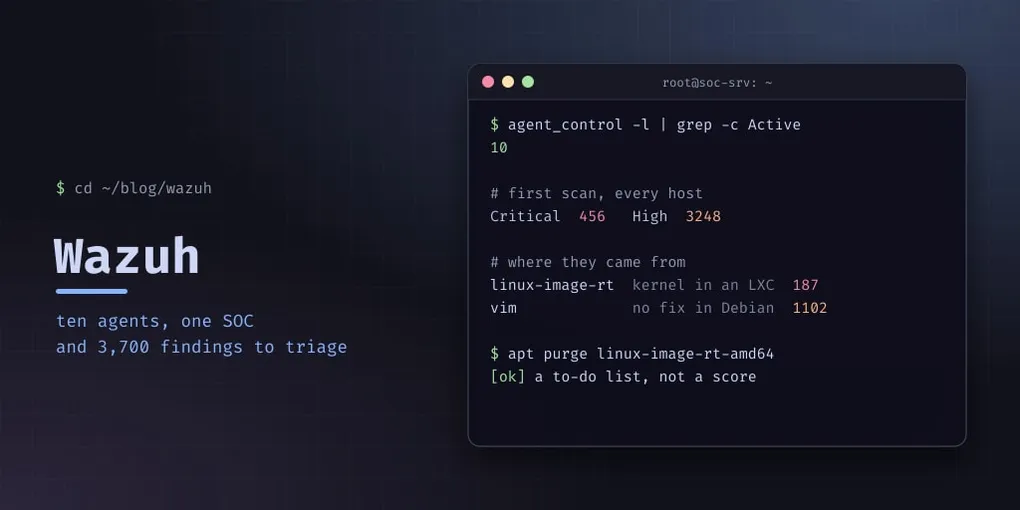
The first full scan reported 456 Critical and 3,248 High vulnerabilities across ten hosts. That looks like an emergency. Most of it was noise, and finding out why taught me more than the dashboard did.
Kernels that never run (187 Critical). One container, the WiFi access point, had three linux-image-rt-amd64 packages installed. The wireguard metapackage depends on “wireguard-modules”, and apt satisfied that with a whole real-time kernel. A container runs the host’s kernel, so those packages never boot, but Wazuh rightly counts their CVEs. I purged them and kept wireguard-tools. The kernel had also set a bogus “reboot required” flag inside the container.
An editor with no fix (1,102 findings). Debian 13 has no patched Vim; the fixes exist only in testing. I purged it from every container, and reinstalled it the same afternoon, because I edit with Vim and nano is not a security control. Those findings stay until Debian ships a fix, and I accept that knowingly.
The real ones. What remained were the public server’s cloud kernel and python3-jwt, both already at Debian’s newest version with no fix available. Its unattended-upgrades will install the fixes when they arrive; the kernel will need a reboot, which the patching dashboard shows.
A CVE count is a to-do list, not a score. Each finding has three questions: is the package actually used, is there a fix, and if not, do I accept the risk?
When Wazuh scans
With the defaults, which I kept:
| What | When |
|---|---|
| Log analysis | continuous |
| Package inventory (syscollector) | every hour, and at agent start |
| Vulnerability detection | on inventory changes, plus a full rescan after each feed update |
| File integrity (FIM), rootcheck, CIS (SCA) | every 12 hours, and at agent start |
So a patched package disappears from the CVE list within about an hour, not immediately. The 12-hour scans count from each agent’s start, not from a clock time, so they drift after reboots.
Pitfalls
- The
4.xinstall URL returns 403. Use the versioned one. vm.max_map_countis a host setting for an indexer in a container.- An agent newer than the manager is refused. Hold the agent package and upgrade the manager first.
sshin a heredoc loop eats the script.ssh -n.- Never apply retention to
wazuh-states-*. - A single node can’t place replicas.
auto_expand_replicas: 0-1on indices that ask for one. - The Grafana plugin’s health check is wrong for wildcard patterns; test with a query.
- Kernel packages inside containers are CVE noise that never runs. Check
dpkg -l 'linux-image-*'before trusting the Critical count. - A public dashboard is a login page on the internet. Mine sits behind the reverse proxy with a rate limit on the login endpoint (10 attempts a minute per IP, then 429). An IP allowlist or a second factor in front of it is still on my list.