~/blog/proxmox-failing-nvme-bad-blocks
My Proxmox SSD Is Dying: Bad Blocks, Linked Clones and Thin Volumes
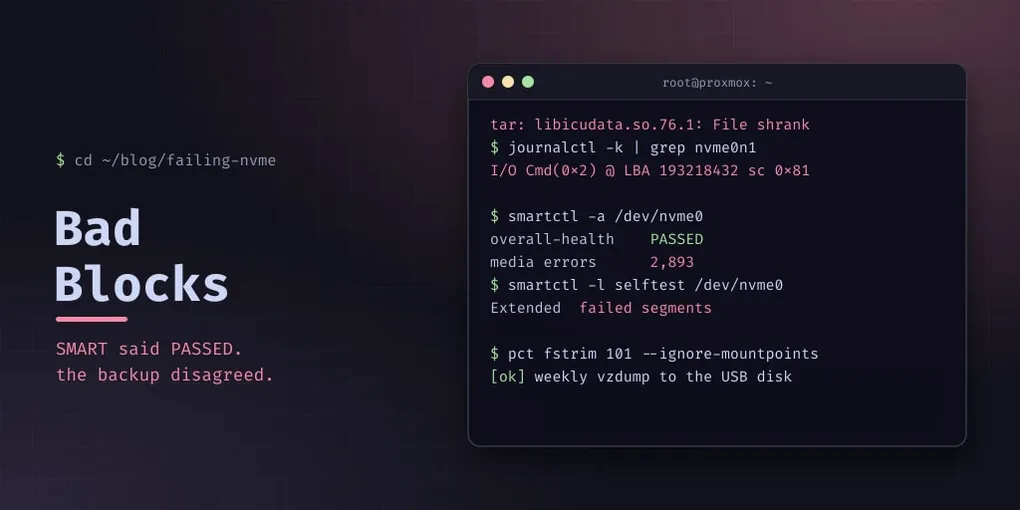
My homelab overview listed “backups with an actual restore test” as a to-do. I started on it with one small container: back it up, shrink its disk, restore it. The backup failed.
tar: ./usr/lib/x86_64-linux-gnu/libicudata.so.76.1: File shrank by 26752560 bytes; padding with zerosA file doesn’t shrink while it’s being read from a stopped snapshot. The kernel log said why:
nvme0n1: I/O Cmd(0x2) @ LBA 193218432, 128 blocks, I/O Error (sct 0x2 / sc 0x81)
critical medium error, dev nvme0n1, sector 193218432
Status code 0x81 with type 0x2 is an unrecovered read error: the drive tried and couldn’t return the data. This is the Proxmox host’s only SSD. Every container and the host system live on it.
SMART said PASSED
smartctl -a /dev/nvme0| Attribute | Value |
|---|---|
| Overall assessment | PASSED |
| Critical warning | 0x00 |
| Available spare | 100% |
| Percentage used | 26% |
| Power-on hours | 40,679 |
| Unsafe shutdowns | 988 |
| Media and data integrity errors | 2,860 |
The summary is reassuring and the last line isn’t. That counter is lifetime unrecovered errors, and it went up every time something read the bad area. The way to get a real answer is to make the drive read everything:
smartctl -t long /dev/nvme0        # ~25 minutes on this drive
smartctl -l selftest /dev/nvme0
Extended Completed: failed segments 40679 193218544 seg 7 0x2 0x81The drive’s own full scan stopped at the same spot the kernel had hit. I reseated the SSD in case it was a connection problem; the PCIe link came back at full speed and the self-test failed at the identical address. That’s damaged flash, not a loose drive. The SSD has to be replaced. The rest of this post is what you do until then.
Which files sit on the bad blocks?
The kernel names a sector, not a file. The pragmatic way to find files is to read all of them:
# inside the container, or on its mounted volume
find / -xdev -type f -print0 | xargs -0 cat > /dev/null 2> unreadable.txt
Every Input/output error names a victim. In the first container there was one: libicudata.so.76.1, the ICU data file from Debian’s libicu76 package.
The fix for a file that comes from a package is to have the package write it again:
apt-get install --reinstall libicu76
dpkg --verify libicu76      # silence = every file matches its checksum
The new copy lands on fresh blocks, the file reads, and the backup works.
Linked clones share their mistakes
Then I ran the same read test on every container before the first scheduled backup, and the same file was unreadable in three more containers and in the template they were cloned from.
That’s how linked clones work on LVM-thin. A clone is a thin snapshot of the template’s volume: until a container rewrites a block, it reads the template’s copy. One bad block in the template is a bad block in every clone that never touched that file. ICU’s data file is rarely rewritten, so all of them still pointed at the original.
The containers were easy: the same --reinstall in each. The template was harder, because a Proxmox template’s base volume is read-only and pct won’t start it. Fixing it means making the LV writable for a few minutes:
lvchange -ay -K pve/base-2000-disk-0      # activate it (-K: it is normally skipped)
lvchange -p rw pve/base-2000-disk-0
mount /dev/pve/base-2000-disk-0 /mnt/tpl
cp good-copy/libicudata.so.76.1 /mnt/tpl/usr/lib/x86_64-linux-gnu/libicudata.so.76.1.new
chown 100000:100000 /mnt/tpl/usr/lib/x86_64-linux-gnu/libicudata.so.76.1.new   # unprivileged uid mapping
chmod 644 /mnt/tpl/usr/lib/x86_64-linux-gnu/libicudata.so.76.1.new
mv /mnt/tpl/usr/lib/x86_64-linux-gnu/libicudata.so.76.1{.new,}   # rename: fresh blocks, atomic swap
md5sum /mnt/tpl/usr/lib/x86_64-linux-gnu/libicudata.so.76.1    # compare with the package's md5sums
umount /mnt/tpl
lvchange -p r pve/base-2000-disk-0
e2fsck -fn /dev/pve/base-2000-disk-0
lvchange -an pve/base-2000-disk-0
The good copy came from a container that had already reinstalled the package, checked against the md5 that dpkg stores for it. The clones were unaffected, because they’re independent snapshots that had each rewritten their own copy by then.
A second bad area turned up in the monitoring container: a forgotten download, unreadable halfway through. I deleted it. No third area has appeared.
Then ext4 walked back onto the bad block
The next afternoon the host crashed. When it came back, the monitoring container’s log was full of this:
EXT4-fs warning: failed to convert unwritten extents to written extents -- potential data loss!
nvme0n1: I/O Cmd(0x2) @ LBA 193218432 ... I/O Error
Same address. The reinstall had freed the bad blocks inside the container’s filesystem, and ext4 had reused them for something new: the systemd journal file. Writes into the damaged area failed, and that journal file was lost.
The missing step was a trim. On a thin volume, blocks a filesystem frees stay allocated to that volume until it’s trimmed. Proxmox doesn’t trim containers automatically, so the freed blocks were still there, mapped to the same physical area, waiting to be reused.
pct fstrim 101 --ignore-mountpoints # and every linked clone of the same template--ignore-mountpoints keeps it off bind mounts (in my case a USB disk with NTFS on it). Trimming the four containers that had held a copy returned 71 GB to the thin pool, which went from 56% to 45% used. That’s a nice side effect of a step I should have taken anyway.
The runbook is now: after rewriting a file that sat on a bad block, trim that container and every linked clone of its template.
The backup job that came out of it
All of this was found by a backup, so backups became the priority:
- A dedicated storage on the USB disk, with
is_mountpointset. If the disk isn’t mounted, the storage goes offline and the job fails, instead of quietly writing 20 GB into the dying SSD’s root filesystem. - A weekly job, Sunday 02:00, every container and the template, snapshot mode (containers keep running), zstd.
- Retention
keep-last=3,keep-weekly=4.
That retention line has a story. I first set keep-weekly=4 on its own, which keeps the newest backup per week. My very next manual test backup therefore pruned the previous backup from the same week, which was the “before” copy of a container I had just resized. Add keep-last so manual runs don’t evict scheduled ones.
The USB disk is the bottleneck, at about 15 MB/s sustained once the page cache fills. A torrent client writing to the same disk made one container’s backup crawl. For the manual run I stopped the client first; a vzdump hook script that pauses it automatically is on the list. And vzdump --stop doesn’t clean up after itself: it left a container locked with snapshot-delete and a leftover snapshot volume, cleared with:
pct unlock 104 && pct delsnapshot 104 vzdumpA full manual run took a bit over an hour, mostly the two largest containers.
What’s next
The replacement SSD will be the restore test that started this: every container restored from these backups onto new hardware. Until then the drive’s SMART counters go to Prometheus, through the same metrics package I installed for patching, and nothing gets cloned from the template without a read test first.
Pitfalls
- SMART “PASSED” isn’t a health check. Read the media-error counter and run the extended self-test.
- A backup is a full read test you were going to run anyway. “File shrank” from tar on a snapshot means a read error; check
journalctl -k. - Linked clones inherit the template’s bad blocks. Test the template and every clone, not just the container that failed.
- A template’s base volume is read-only.
lvchange -ay -K, then-p rw, and put it back with-p r. - Rewriting a file doesn’t retire the bad block. Trim, or the filesystem will reuse it.
keep-weeklyalone prunes your manual backups. Pair it withkeep-last.- Set
is_mountpointon USB backup storage, or an unplugged disk fills the host’s root. - A backup job without notifications is a hope. Mine still reports only to the task log; hooking it into the push channel is next.