~/blog/wifi-access-point-lxc-container
A WiFi Access Point Inside an LXC Container
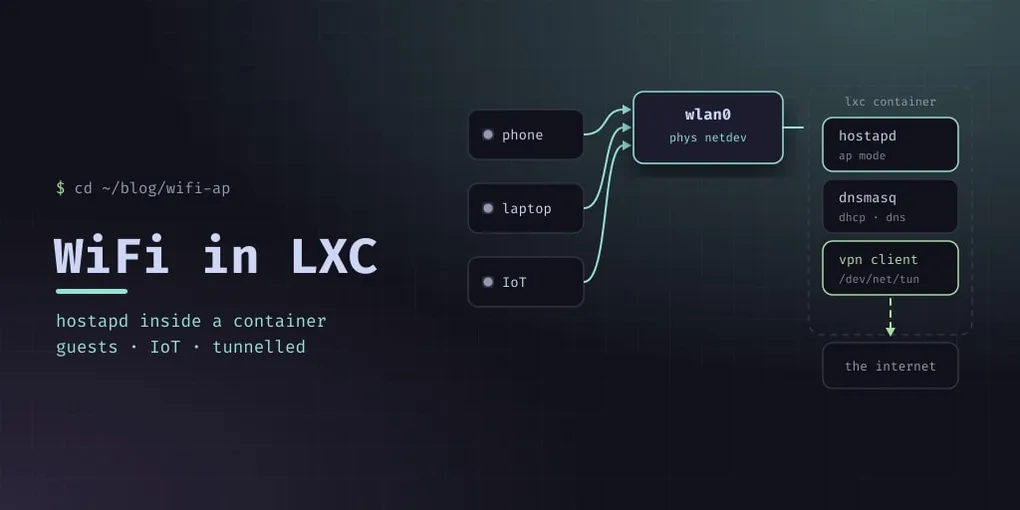
Every guide for a home WiFi access point assumes a Raspberry Pi or a spare machine. Mine runs in a Proxmox container, which is one small configuration step away from being impossible — and that step is worth writing down, because the error you get when you skip it tells you nothing.
The goal: an isolated wireless network, separate from the wired LAN, for guests and anything I do not fully trust, with DNS filtering and a VPN underneath.
The problem: a container cannot see the radio
A container shares the host kernel, so a wireless card on the host is invisible inside it by default. iw dev returns nothing. hostapd fails with a driver error that reads like a missing package.
There are two plausible fixes and only one good one:
- macvlan — plausible, and it does not work for an AP:
hostapdneeds to set the interface to AP mode, and macvlan interfaces cannot. - A physical netdev passthrough — hand the actual card to the container. The container then owns the radio and does everything itself: AP mode, bridging, the lot.
The second one is a two-line container option:
# on the Proxmox host: /etc/pve/lxc/107.conf
lxc.net.1.type: phys
lxc.net.1.link: wlan0
lxc.net.1.name: wlan0
lxc.net.1.flags: up
That is the whole trick. net0 stays on the normal LAN bridge so the container is reachable and can reach the internet; net1 is the physical card, appearing inside as wlan0.
Two more container settings, both needed and for different reasons:
features: nesting=1
lxc.cgroup2.devices.allow: c 10:200 rwm
nesting=1 is what lets the container configure its own network stack the way hostapd expects. The c 10:200 line is /dev/net/tun, the character device c 10:200 — the container needs it to bring up a VPN tunnel, which is the point of putting this network in a container in the first place. Without it, the VPN client fails at startup with a permissions error and you go looking in entirely the wrong place.
Give the container more RAM than you would expect for the work: an access point plus DNS plus a tunnel is not heavy, but 256 MB is uncomfortably tight.
hostapd
interface=wlan0
bridge=br0
driver=nl80211

ssid=lab-wifi
hw_mode=g
channel=1
wmm_enabled=1

# WPA2-PSK
auth_algs=1
wpa=2
wpa_key_mgmt=WPA-PSK
rsn_pairwise=CCMP
# wpa_passphrase=<your passphrase>
ieee80211n=1
ht_capab=[HT40+][SHORT-GI-20][SHORT-GI-40]

ctrl_interface=/var/run/hostapd
bridge=br0 is doing real work: hostapd adds the wireless interface to the bridge itself, so the container’s br0 is the access point’s uplink — anything with an address on that bridge routes normally, and you never have to script interface juggling.
driver=nl80211 is the modern interface into the kernel’s wireless stack. hw_mode=g is 2.4 GHz, and with this card it isn’t a choice: Intel WiFi cards only allow AP mode on 2.4 GHz, and the 40 MHz request in ht_capab isn’t granted either, so the network runs at 20 MHz. That’s 144 Mbit/s on paper and 50–70 Mbit/s shared in practice. 5 GHz would need different hardware: a USB adapter whose chipset supports AP mode on 5 GHz, or a separate access point wired to the bridge.
ht_capab must match the channel. [HT40+] is only valid on channels 1–9 and [HT40-] on 5–13. Get it wrong and hostapd refuses to start (“Hardware does not support configured channel”), but only at the next start: a live channel switch doesn’t check it. I found that out when the network stayed down after a config change.
ctrl_interface is not just for hostapd_cli; it is what makes the client notifications further down possible.
DHCP and DNS: dnsmasq
interface=br0
bind-interfaces
dhcp-range=10.42.0.100,10.42.0.200,12h
dhcp-option=option:router,10.42.0.1
dhcp-option=option:dns-server,10.42.0.1

no-resolv
server=1.1.1.1
server=1.0.0.1

log-queries
log-facility=/var/log/dnsmasq-queries.log
log-async
bind-interfaces matters here: without it dnsmasq listens on everything, including the LAN interface, and the container quietly becomes a DNS server for your whole network.
no-resolv plus explicit server= lines means the upstream resolvers are exactly what you wrote — otherwise it also reads /etc/resolv.conf and you have an unpredictable query path.
The query log is the interesting part. log-queries with a dedicated log-facility gives you a per-device record of every lookup on the network: which device asked for what, and when. That log is the sensor for everything below.
Blocking at the DNS layer
Domain blocking belongs in the resolver, not in a browser extension that only covers one device:
conf-file=/etc/dnsmasq-ads/adblock.confThe list itself is the OISD set, pulled by a timer and rewritten into dnsmasq’s address=/domain/ form. With no address, blocked names get an NXDOMAIN answer instead of a fake IP:
#!/bin/bash
set -euo pipefail
URL="https://big.oisd.nl/"
TMP=$(mktemp)
timeout 180 wget -q -T 90 -O "$TMP" "$URL"
# ... rewrite into address=/…/ lines, then:
dnsmasq --test -C /etc/dnsmasq-ads/adblock.conf && systemctl reload dnsmasq
Two things make this safe to run unattended. Write to a temporary file and only replace the live one if the download succeeded — a truncated list caused by a timeout should not wipe your blocking. And always dnsmasq --test before reloading: a malformed generated config fails the reload, and a failed reload means no DNS for every device on that network.
Knowing when a device joins
hostapd_cli -a runs a script on every access point event:
ExecStart=/usr/sbin/hostapd_cli -i wlan0 -a /usr/local/sbin/ap-sta-event.shThe script fires on connect and disconnect, and the connect path resolves the new client into something human-readable:
AP-STA-CONNECTED)
  mac="$2"
  sleep 2                                  # let dnsmasq record the lease first
  line=$(grep -i "$mac" /var/lib/misc/dnsmasq.leases | tail -1)
  ip=$(awk '{print $3}' <<<"$line")
  hostname=$(awk '{print $4}' <<<"$line")
  ;;
The sleep 2 is not superstition. The association event fires before DHCP completes, so reading the lease file immediately gives you nothing — you get a MAC address and no name, every time. Two seconds is enough for the lease to appear and turns an opaque MAC into “someone’s phone joined”.
Watching for malicious lookups
The query log makes a cheap sensor: tail it, match domains against a threat feed, and report. Mine is deliberately alert-only — it logs, it does not block:
syslog.openlog("dns-threat", 0, syslog.LOG_DAEMON)
syslog.syslog(syslog.LOG_INFO, f"started: {len(threats)} threat domains loaded, alert-only mode")
and the output is logfmt — client=… device=… domain=… — so the log pipeline can extract fields without a regex per line. The threat list refreshes on its own timer.
Alert-only is a choice worth defending. A blocklist that blocks silently will eventually block something you need, at the worst time, and you will have no idea why. Alerting gives you the same information with none of the failure mode, and if a device on your network really is beaconing to a known-bad domain, the notification is the useful part anyway.
“The WiFi is slow”
When someone says that, there are three suspects: the radio, the VPN, and DNS. Measure them separately before changing anything.
The tunnel, from inside the container, without the radio in the path:
curl --interface tun0 -o /dev/null -w '%{speed_download}\n' \
  'https://speed.cloudflare.com/__down?bytes=25000000'
Mine measured 220–420 Mbit/s through the VPN, with 13 ms latency and no loss, and DNS answered uncached in 14 ms. So the radio was the bottleneck, and the radio’s problem was the neighbourhood: channel 6 had fourteen other networks on it, nine of them strong.
An Intel card in AP mode can’t scan other channels (iw dev wlan0 scan returns “Operation not supported”), but it can move. hostapd announces a channel switch to clients, which follow without disconnecting:
hostapd_cli -i wlan0 chan_switch 5 2412 ht     # 2412 MHz = channel 1, 2437 = 6, 2462 = 11
sleep 20
iw dev wlan0 scan dump                          # networks seen on the new channel
Channel 1 had seven neighbours and two strong ones; channel 11 had a hidden network at −24 dBm and a TV’s WiFi Direct. Channel 1 it was, persisted in hostapd.conf with the matching ht_capab.
One measurement that doesn’t help: pinging phones over the air. iOS power saving produces 150–300 ms spikes on a perfectly good link. Per-station retry counts (iw dev wlan0 station dump) and a speed test on the phone are better signals.
When the tunnel dies
The VPN client runs OpenVPN with --persist-tun, which keeps the tunnel interface and its routes up across reconnects. That is normally what you want. After the home router restarted, though, it produced a deadlock: the session was dead, but the default route still pointed into the tunnel. OpenVPN’s DNS lookup of its own server went into the dead tunnel too, so it could never reconnect. Every WiFi client was offline, and nothing alerted, because the interface was “up”.
Two changes:
- “Up” now means traffic passes. The metric the dashboard and alert use is a ping through
tun0to two public resolvers, not the state of the interface. - A watchdog timer. Every minute, if nothing has passed through the tunnel for three minutes, it restarts the VPN service, at most once every five minutes. It logs each decision to syslog, so its history is in the log pipeline.
if ping -c1 -W3 -I tun0 1.1.1.1 >/dev/null || ping -c1 -W3 -I tun0 9.9.9.9 >/dev/null; then
    rm -f "$STATE/down-since"; exit 0
fi
# ...record when it went down; after 180 s, and not within 300 s of the last attempt:
systemctl restart vpn-client.service
Pitfalls
- macvlan will not work for an access point. Pass the physical device through.
- The card is pinned. Once the container owns it, the host cannot use it as a client — plan the hardware accordingly.
- WPA2 only, as written.
wpa=2is WPA2-PSK; if you want WPA3 you needwpa_key_mgmt=SAEandieee80211w, and older devices may stop connecting. bind-interfaces. Leave it out and you are running DNS for the entire LAN.- Reloading a broken blocklist takes the network down. Validate before reload.
- No
/dev/net/tunmeans no VPN. Add the device allow, and do not expect a clear error if you forget. - The container needs the driver loaded before it starts. After an unclean host reboot,
iwlwifididn’t autoload, there was nowlan0to pass through, and the container failed to start./etc/modules-load.d/iwlwifi.confon the host now loads it at every boot. - Intel cards: 2.4 GHz only in AP mode. Choose the channel by survey, and keep
ht_capabconsistent with it. - An interface that is up isn’t a working tunnel. Test with traffic, and restart on failure.
- Kernel logs are unavailable in a container.
imklogcannot read/proc/kmsgwithoutCAP_SYSLOG, so wireless driver warnings on the host are not somewhere you can look from inside — debug those from the Proxmox host.